Project notes
Building "Ratatouille": AiTM, DLL Sideloading, and Memory Forensics
Building the Ratatouille attack chain, from a mock AiTM mailbox takeover through DLL sideloading, process injection, and logon persistence, with the complete investigation PoC.
On this page
For Schematics NPC CTF 2026, I built Ratatouille, a Medium forensics challenge that connects an adversary-in-the-middle (AiTM) mailbox takeover with a ValleyRAT-style workstation compromise. The attacker first gets access to an IT employee’s mailbox, then uses that trusted internal account to deliver a fake Chrome update to a finance employee.
The name is a small RAT joke, obviously :3. The development work was mostly about making the two entry points convincing and investigable: the presentation link and mock sign-in flow in Case A, followed by the signed loader and sideloaded DLL in Case B. Each transition needed to leave something participants could follow across mail, browser history, network traffic, Sysmon, and memory.
This page walks through how I built those parts, the implementation problems along the way, and the complete PoC from the responder’s perspective.
One Story, Two Cases
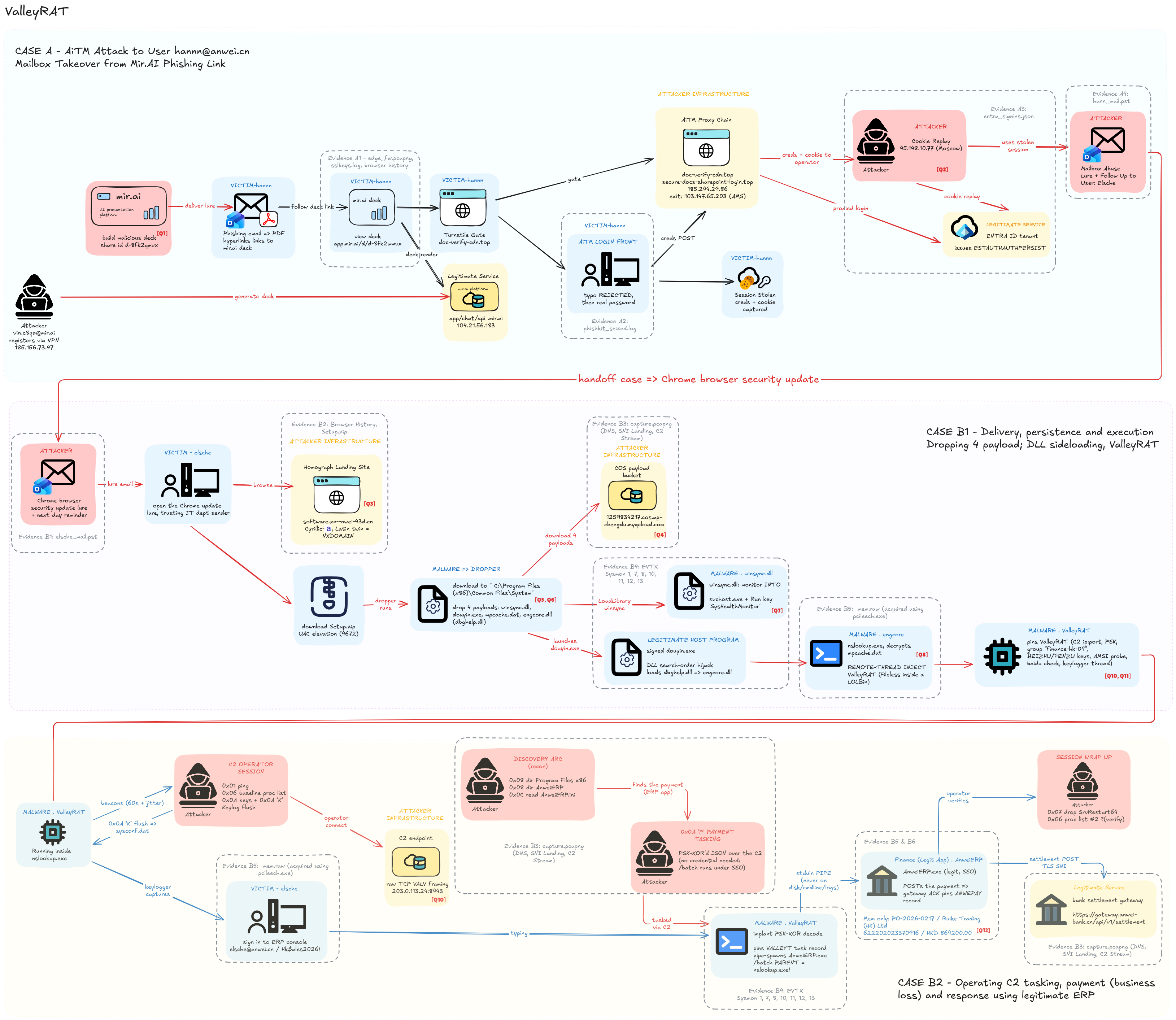
Open the attack-chain diagram at full size to follow the individual steps and evidence sources.
| Case | Incident | Main evidence |
|---|---|---|
| A | Hannn follows a shared AI presentation into a mock AiTM login, followed by mailbox session replay | mail.pst, Chrome History, capture.pcapng, entra_signins.json |
| B | Elsche runs a fake browser update that leads through DLL sideloading to a RAT inside nslookup.exe | mail.pst, History, Sysmon.xml, capture.pcapng, mem.raw, matching Windows PDB, finance baseline |
The connection is a message sent from Hannn’s compromised mailbox. It appears in his Sent Items and Elsche’s Inbox with the same Message-ID. Participants can establish that connection before following what happens on the second workstation.
Case A
Presentation notification → PDF link → shared AI deck
  → verification interstitial → mock sign-in → mailbox takeover

Case B
Internal update email → lookalike software portal → Setup.zip
  → signed douyin.exe loads local dbghelp.dll
  → payload runs inside nslookup.exe → C2 activity → live response
  ↳ SysHealthMonitor Run value restarts the loader at user logon
Both cases ran on a Windows 11 Home 25H2 x64 Hyper-V VM, build 26200, with Chrome, Sysmon, Python, and a loopback capture adapter. I restored a clean snapshot between the runs. The services used local DNS mappings and lab TLS certificates. Both environments needed port 443, so they ran separately.
Developing the AiTM Scenario
Starting With the Presentation Lure
I wanted the first suspicious link to arrive in something that looked like an ordinary collaboration workflow. Hannn receives a notification about a shared “Q1 Sales Performance Review” presentation. Its PDF attachment links to a deck on the mock AI platform.
The mailbox includes normal correspondence and a legitimate presentation-sharing notification too. His browser history also contains several other decks. That gives participants a reason to connect the attachment’s actual URL with the history, rather than pick whichever presentation identifier appears first.
The notification has its own clues: the sender is share-noreply@mir-deckshare.top, while Reply-To uses support@deckshare-help.top. The source generator builds a PDF link attachment rather than just placing the whole phishing chain in the message body.
Building a Small AI Platform
aitm-phish/simulator/mir_ai.py provides the mock AI service. It serves chat activity, a deck list, normal decks, and the attacker-shared presentation. The deck metadata includes its owner, sharing settings, generated slides, and creation history.
These are the relevant fields from deck_body():
'id': MAL_DECK_ID,
'title': 'Q1 Sales Performance Review -- internal pre-read',
'owner': ATTACKER_USER,
'visibility': 'link',
The same object contains the sharing settings:
'share': {'enabled': True, 'requires_login': False,
          'shared_at': _iso(8, 21, 26)},
The initial deck can be viewed by link. The suspicious sign-in appears later, when Hannn clicks “Review Secure Documents.” That change in context matters: being able to open a presentation does not establish that the next document-verification site belongs to the same service.
Separating the Verification Page and Sign-In Front
The AiTM lab has two stages after the deck:
| Host | Role in the lab |
|---|---|
doc-verify-cdn.top | Microsoft-themed verification interstitial with a Turnstile-style checkbox |
secure-docs.sharepoint-login.top | Mock SharePoint sign-in and document landing page |
The interstitial is a local simulation, including its checkbox and delayed redirect. It gives the browser visit an intermediate step and another hostname for participants to connect. It does not contact a real CAPTCHA service.
aitm_proxy.py handles these virtual hosts on the same local TLS service. Its login handler only accepts the configured mock host and path. This is the request-routing guard from the source:
if host != PHISH_HOST or path != '/common/login':
    self.send_response(404)
    self.send_header('Content-Length', '0')
    self.end_headers()
    return
The scripted victim enters an incorrect password before the planted correct one. The mock server renders an error for the first attempt and the document page with a lab session cookie for the accepted attempt. That produces a browser interaction with an observable retry, rather than an inert screenshot of a login page.
The implementation is a local reproduction of the story’s AiTM behavior. It validates a planted credential pair and issues a fixed lab token. Its login.microsoftonline.com virtual host is cosmetic and does not proxy authentication to a live Microsoft tenant. Likewise, the MFA and later foreign mailbox access are represented in the scenario and generated identity export, rather than performed against a real account.
Instrumenting the Browser Run
For development, the mock service records events such as login_page_view, login_submit, cred_reject, and cookie_stolen. That log lets me check the sequence produced during the browser run.
The beginning of the logging helper is small:
def kitlog(event, **kv):
    rec = {'ts': datetime.utcnow().strftime('%Y-%m-%dT%H:%M:%SZ'),
           'event': event, 'src_ip': '127.0.0.1'}
    rec.update(kv)
    line = json.dumps(rec)
The rest of the helper serializes writes under a lock. The kit log and TLS key log are development artifacts and are absent from the final player package. The investigation instead follows the supplied mail, history, capture, and Entra export.
That distinction affects what each file can establish. The VM capture covers Hannn’s browser activity. The later Outlook and EWS access from 45.148.10.77 comes from the generated Entra records. Participants should not expect that foreign mailbox connection to appear in the local browser capture.
From the Sign-In to Session Replay
The important part of Case A is the session established after authentication. In the story, Hannn completes MFA during the intercepted sign-in. The attacker then reuses the authenticated session to reach the mailbox. Knowing the password and having a usable session are different findings, so I wanted the identity records to show the later access too.
In the local implementation, the login form submits loginfmt and passwd to /common/login. A failed comparison returns the error page. The accepted planted credentials produce the mock document page and an ESTAUTHAUTHPERSIST lab cookie. This gives the browser run a complete request-and-response sequence without authenticating against a real tenant.
The later mailbox access is generated in entra_gen.py. These are the first two replay entries from its schedule:
('rep-1', 7, 18, 30, 'Outlook Web', 'Remembered MFA'),
('rep-2', 7, 19, 47, 'Exchange Web Services', None),
The helper writes those entries with REPLAY_IP and converts the scenario’s UTC+08:00 time to UTC. The first row therefore appears as 2026-09-24T10:30:00Z from 45.148.10.77. The earlier Shenzhen activity uses 203.80.14.132. The source represents session reuse through these records, including the remembered-MFA field. It does not perform an actual cookie replay against Microsoft.
The investigation has to join that identity activity to the browser visit and subsequent sent mail. Finding the fake login host explains the interception. The later Outlook and EWS records show the mailbox access represented in the case.
Connecting the Compromised Mailbox to Case B
The mailbox generators build the sent lure and reminder using shared, base-relative send times. In mail_gen_hannn.py, their identifiers are derived as follows:
pivot_lure_mid = '<%s.8E4A11C9@anwei.cn>' % d(2, 9, 31).strftime('%Y%m%d%H%M%S')
pivot_fu_mid = '<%s.B2F703EA@anwei.cn>' % d(1, 14, 5).strftime('%Y%m%d%H%M%S')
For the October run, the first message becomes:
<20260929093100.8E4A11C9@anwei.cn>The matching message in both mailboxes is the handoff between incidents. The body applies pressure to install a Chrome security update, and the sender is now an internal IT account. Case A explains how that sender became available to the attacker.
Developing the DLL Sideloading Chain
From the Email to Setup.exe
The update site is software.аnwei.cn, with Cyrillic U+0430 for its first а. Chrome and DNS show its Punycode form, software.xn--nwei-43d.cn. The ordinary internal portal uses Latin a.
The download is Setup.zip, containing a .NET Setup.exe. In the controlled VM run, it downloads four components from a mock COS-style payload host and stages them under:
C:\Program Files (x86)\Common Files\SystemThe components have separate roles:
| File | Role in the simulated chain |
|---|---|
winsync.dll | Monitoring and Run-key persistence component |
douyin.exe | Signed host executable used for sideloading |
engcore.dll | Proxy DLL staged under the dependency name dbghelp.dll |
mpcache.dat | Encoded payload consumed by the sideloaded component |
This split creates a sequence that can be reconstructed from file creation, image loading, registry activity, and process creation. It also avoids making a single suspicious executable the answer to every question.
Two Execution Paths From the Dropper
The dropper runs three steps after downloading the files: StageSideload(), LoadMonitor(), and LaunchLoader(). The first prepares the DLL names. The second loads winsync.dll directly into Setup.exe and calls its exported functions. The last starts douyin.exe --install with the staging directory as its working directory.
Setup.exe
├── LoadLibrary(winsync.dll)
│   ├── WinSync_Start → remote LoadLibrary into svchost.exe
│   └── WinSync_Read  → SysHealthMonitor Run value
└── douyin.exe --install
    └── local dbghelp.dll → payload injected into nslookup.exe
These are separate branches. winsync.dll establishes the monitor and writes the logon entry. The dbghelp.dll sideload carries the next payload into nslookup.exe. That is why the evidence contains remote-thread activity involving both svchost.exe and nslookup.exe, rather than one straight parent-child chain containing every component.
The Dependency Name Is the Important Part
The signed host imports dbghelp.dll. The dropper copies engcore.dll into the host’s directory using that dependency name. A genuine system copy is kept beside it as dbghelp_orig.dll for forwarded exports.
The resulting directory relationship is:
Common Files\System\
├── douyin.exe          signed host
├── engcore.dll         downloaded component
├── dbghelp.dll         copy of engcore.dll loaded by the host
├── dbghelp_orig.dll    genuine dependency used for forwarding
├── winsync.dll
└── mpcache.dat
The signed executable and the locally loaded DLL play different roles. The evidence to look for is the module path: douyin.exe loads dbghelp.dll from this staging directory.
In the source, I can see the copy operation directly. In the player package, the relationship is reconstructed from file creation and ImageLoad records. Both DLL samples are not distributed, so the PoC describes the renamed-copy relationship as supported by the paths and sequence, rather than claiming a hash comparison that participants cannot perform.
Forwarding the Exports the Host Expects
A replacement DLL still has to satisfy the imports the host expects. In simulator/src/engcore.cpp, the proxy forwards the relevant dbghelp exports to dbghelp_orig.dll. These are three of the forwarding declarations:
#pragma comment(linker, "/export:SymCleanup=dbghelp_orig.SymCleanup")
#pragma comment(linker, "/export:SymFromAddr=dbghelp_orig.SymFromAddr")
#pragma comment(linker, "/export:SymInitialize=dbghelp_orig.SymInitialize")
The build script supports MSVC and a MinGW fallback. MSVC uses the linker declarations. The MinGW branch supplies a definition file with equivalent forwarders.
This was part of getting the reproduction to run long enough to produce useful evidence. Replacing a DLL filename is only the visible setup step. Missing exports or dependencies can stop the host before the rest of the intended chain happens.
The 32-Bit Dependency That Broke the Run
One concrete bug was the architecture of the genuine forwarded dependency. The host and proxy are x64, but selecting the wrong system directory supplied a 32-bit dbghelp.dll. The source comments record the resulting startup failure from the September 30 lab run.
The dropper’s directory selection accounts for the process architecture:
var sys = Environment.Is64BitProcess
    ? Environment.GetFolderPath(Environment.SpecialFolder.System)
    : Environment.GetFolderPath(Environment.SpecialFolder.SystemX86);
The chosen system DLL is copied under the forwarding name. The build also checks the native compiler target, warning if a MinGW toolchain is not targeting x64.
Another startup issue came from compiler runtime dependencies. The MinGW build uses static linking because the staging directory and injected process do not necessarily have the development machine’s libstdc++, libgcc, or libwinpthread DLLs available. A successful compilation did not mean the component could load in the VM’s actual runtime environment.
Following the Transition Into nslookup.exe
After sideloading, engcore.cpp handles the transition in this order:
- Create a fresh
nslookup.exein a suspended state. - Read
mpcache.dat. ItsMPC1container records the payload length and bootstrap entry offset. The payload is XOR-encoded with an embedded key. - Decode the payload, allocate memory in
nslookup.exewithVirtualAllocEx, and copy the bytes withWriteProcessMemory. - Start a remote thread with
CreateRemoteThreadat the allocated base plus the recorded entry offset. The compiler chooses the code layout, so the bootstrap entry cannot be assumed to sit at byte zero. - Resume the original thread with
ResumeThread. One lab bug was passing the process handle instead of the thread handle, so the source keeps both handles separately. - Continue running the implant inside
nslookup.exeafter the signed loader exits. This explains why the parent is no longer alive in the acquired process tree. - Keep the
VALLEYCconfiguration in memory and contact203.0.113.24:8443using the lab’sVALVframing. The group isfinance-sz-04. TheBEIZHUandFENZUregistry values record the group and subgroup, but neither is an autostart trigger.
These lines from StageThread() keep the process and original thread handles separate:
HANDLE hProc = NULL, hThread = NULL;
if (!SpawnNslookupSuspended(dir, &hProc, &hThread)) return 1;
After the payload has been copied into the target, the remote thread starts at remote + entryOffset:
HANDLE th = CreateRemoteThread(hProc, NULL, 0,
    (LPTHREAD_START_ROUTINE)((SIZE_T)remote + entryOffset),
    NULL, 0, NULL);

// ... check the result and close the remote-thread handle ...

ResumeThread(hThread);
These are selected lines from the source, with allocation, copying, and error handling omitted. th is the new remote thread. hThread is the original suspended thread that needs resuming.
From the investigator’s perspective, the useful sequence is the signed host creating nslookup.exe, followed by remote-thread activity into that process. The live memory evidence then places the implant configuration inside nslookup.exe. Those sources describe different points in the same transition.
How the Chain Persists
The logon persistence is written by WinSync_Read in winsync.cpp. It creates the SysHealthMonitor string value under the current user’s Run key:
Key:   HKCU\Software\Microsoft\Windows\CurrentVersion\Run
Value: SysHealthMonitor
Data:  "C:\Program Files (x86)\Common Files\System\douyin.exe" --install
At the next logon for that user, the entry is intended to start the signed loader again. The local dbghelp.dll and mpcache.dat remain in its directory, allowing the sideloading and injection sequence to run again. This is user-logon persistence through the loader, rather than persistence supplied by the injected nslookup.exe process itself.
Resolving the install directory needed some care. Calling GetModuleFileNameA(NULL, ...) from the DLL returns the host executable’s path, which would point at the temporary Setup.exe location. WinSync_Read instead obtains its own module handle and resolves the path of winsync.dll. That gives it the directory containing douyin.exe. It also records that directory as HKCU\Software\ValleyRAT\DropDir for the implant to read later.
The C2-controlled step uses that DropDir value. In valleyrat.cpp, both command 0x09 and the permitted 0x07 argument call DropPersist(), which copies douyin.exe to SrvRestart64.exe in the same directory.
| Artifact | What it does in this implementation |
|---|---|
Run\SysHealthMonitor | Registers the signed loader for the user’s next logon |
ValleyRAT\DropDir | Records where the staged components live |
ValleyRAT\BEIZHU and FENZU | Store implant group metadata |
SrvRestart64.exe | An additional on-disk copy of the signed loader |
The helper does not register another Run value, install a service, or launch the copied file. Its name alone does not make it a second working autostart mechanism. The existing SysHealthMonitor value still points at douyin.exe. The supplied evidence shows the Run-value creation and the later file writes, but it does not include a reboot test.
This also explains why I kept the source behavior separate from the final packet evidence. The scripted operator includes a 0x07 task, but the released capture has no extractable frame proving that command caused a particular write. The PoC uses the nslookup.exe FileCreate records to establish that SrvRestart64.exe was created.
Capturing the Sideloading Events Without Losing Them to Noise
The Sysmon configuration explicitly includes the local dependency paths. This ImageLoad rule is one example:
<ImageLoad onmatch="include">
  <ImageLoaded condition="contains">\Common Files\System\dbghelp.dll</ImageLoaded>
</ImageLoad>
Other rules cover the loader’s child processes, remote threads targeting svchost.exe and nslookup.exe, staged files, and persistence values.
The source also documents why a broad ProcessAccess rule targeting every access to svchost.exe was removed: system noise could wrap the log and destroy the useful events. The configuration instead uses remote-thread events for that injection and focuses ProcessAccess logging on the staging directory and nslookup.exe.
Logging was therefore part of building the challenge. I needed enough history to connect the DLL load to the next process, while keeping that history available through acquisition.
Rebuilding and Collecting the Case
The generators share October 1 as their reference day: Case A’s incident is September 24, the update and reminder are September 29 and 30, and Case B runs on October 1. The runbook regenerates the mail corpora and checks their dates before another VM run.
For example, from the Case B repository:
python simulator\mail_gen.py --eml-dir simulator\mail --base 2026-10-01
powershell -ExecutionPolicy Bypass -File simulator\make_pst.ps1
python tools\check_case_dates.py --base 2026-10-01
Memory is acquired while the implant host and relevant application processes are still alive. The collector then checks the dump for the configuration and task markers before proceeding with the remaining artifacts. The payment at the end of the scenario supplies an impact finding. The full carving and database comparison are covered in the PoC below.
There was also a very personal lab lesson:
i accidentally dumped my own identity in memory due to outlook login :u
The memory image captures the workstation’s wider state, including applications signed in during the run. I also had to remember what else was open in that VM, hehe.
The release custody record documents the mappings from local mock-service addresses to story addresses in the capture and selected Sysmon DNS fields. Case B’s timestamps stay aligned with its run. For Case A, the PoC uses URLs, the account, and the shared Message-ID as correlation points because its clocks do not support a precise second-by-second reconstruction.
Participants submit twelve findings to a separate quiz server to get the flag. I kept the flag out of the evidence package.
Proof of Concept: Responder’s Point of View
The following investigation starts with the distributed evidence. Set the Volatility checkout path for your own machine where indicated in the memory-analysis commands.
We started with the two case folders and followed the clues from one file to the next. The archive extracts to a top-level dist/ folder. Run the commands below from inside it (cd dist).
1. Deck and Mailbox Pivot
We opened both PSTs in Outlook. On Linux, readpst -e gave us one .eml file per message for searching:
mkdir -p /tmp/rat-case-a-mail /tmp/rat-case-b-mail
readpst -e -o /tmp/rat-case-a-mail case-a/mail.pst
readpst -e -o /tmp/rat-case-b-mail case-b/mail.pst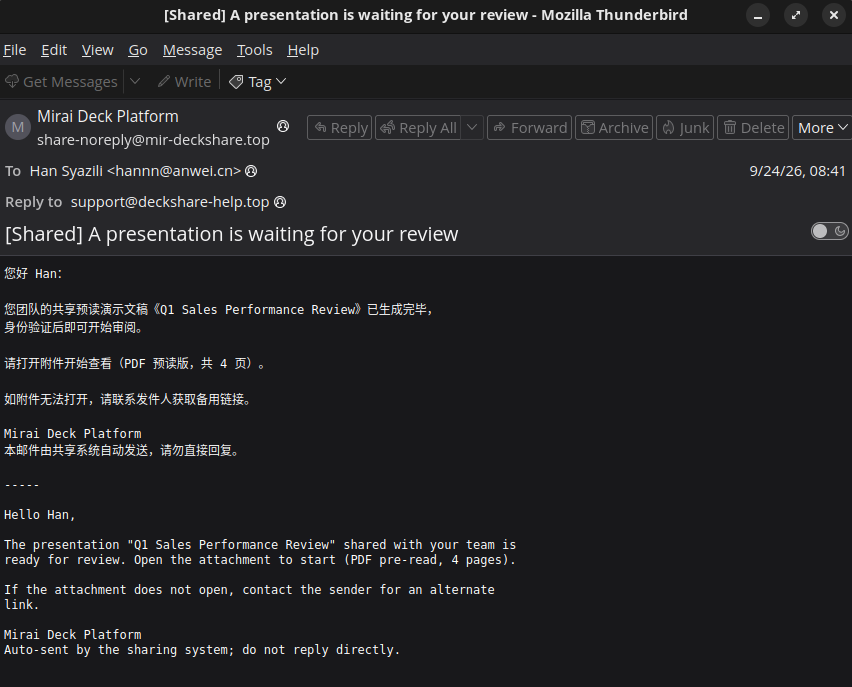
In Hannn’s mailbox, we found a deck notification from share-noreply@mir-deckshare.top. Its Reply-To was support@deckshare-help.top. We also found the same Chrome-update message in Hannn’s Sent Items and Elsche’s Inbox. The matching Message-ID, <20260929093100.8E4A11C9@anwei.cn>, is our bridge between the mailboxes.
readpstgarbled the Chinese subject on our end. Open the PST in Outlook if you want to see it properly :3
The deck email asked Hannn to open Q1_Sales_Performance_Review.pdf. We opened the attachment and checked its link, which pointed to https://app.mir.ai/d/d-8fk2qmvx. That gave us a URL to look for in his browser history.
Next, we queried Hannn’s Chrome History for presentation visits:
import sqlite3

c = sqlite3.connect('file:case-a/History?mode=ro', uri=True)
for (url,) in c.execute("SELECT url FROM urls WHERE url LIKE 'https://app.mir.ai/d/%'"):
    print(url)
https://app.mir.ai/d/d-8fk2qmvx
https://app.mir.ai/d/d-h7t3kp
https://app.mir.ai/d/d-m4k9vt
https://app.mir.ai/d/d-p2n8xr
https://app.mir.ai/d/d-t6r2zcSeveral decks appear here, but only d-8fk2qmvx matches the PDF link. That gave us Q1.
The Entra export showed what happened to Hannn’s account after the browser visit:
import json

with open('case-a/entra_signins.json') as f:
    rows = json.load(f)['value']
for row in rows:
    if row['userPrincipalName'] == 'hannn@anwei.cn':
        print(row['createdDateTime'], row['appDisplayName'],
              row['ipAddress'], row['location']['city'])
2026-09-24T00:51:00.0000000Z Outlook Web 203.80.14.132 Shenzhen
2026-09-24T00:53:00.0000000Z Microsoft Office Web Apps 203.80.14.132 Shenzhen
2026-09-24T06:40:45.0000000Z Outlook Web 103.147.65.203 Amsterdam
2026-09-24T10:30:00.0000000Z Outlook Web 45.148.10.77 Moscow
2026-09-24T11:47:00.0000000Z Exchange Web Services 45.148.10.77 MoscowThe later Outlook and EWS rows from 45.148.10.77 gave us Q2. The mailbox access comes from Entra, while the pcap covers Hannn’s browser visit.
2. Following Elsche’s Fake Update
In Elsche’s Inbox, we found the fake Chrome security-update mail from Hannn. Its URL looked like the internal software portal, but the а in software.аnwei.cn is Cyrillic U+0430. The browser stored its wire form, software.xn--nwei-43d.cn.
We made a copy of History, added .sqlite to the copy, and opened it in a SQLite viewer. Python works too:

import sqlite3

c = sqlite3.connect('file:case-b/History?mode=ro', uri=True)
print('Visited:', c.execute(
    "SELECT url FROM urls WHERE url LIKE '%xn--nwei-43d%'"
).fetchall())
print('Downloads:')
for row in c.execute(
    "SELECT DISTINCT target_path, tab_url FROM downloads WHERE tab_url LIKE '%xn--nwei-43d%'"
):
    print(*row)
Visited: [('https://software.xn--nwei-43d.cn/',)]
Downloads:
C:\Users\elshe\Downloads\Setup.zip https://software.xn--nwei-43d.cn/download/Setup.zipThat gave us the website for Q3 and the ZIP name for Q5. Normal IT mail uses Latin software.anwei.cn, which makes the lookalike easier to spot.
3. Packet Capture and the COS Bucket
Next, we listed the DNS queries and TLS SNI names in Case B’s capture:
tshark -r case-b/capture.pcapng \
  -Y 'dns.flags.response == 0 || tls.handshake.type == 1' \
  -T fields -e dns.qry.name -e tls.handshake.extensions_server_name | sort -u
Two of the names used myqcloud.com. We could also look at those DNS packets with tcpdump:
tcpdump -nn -A -r case-b/capture.pcapng 'port 53' 2>/dev/null | \
  rg -a 'myqcloud.com'
We got two COS hosts: anwei-fin-reports-1256738.cos.ap-shanghai.myqcloud.com and 1259834217.cos.ap-chengdu.myqcloud.com.

Elsche’s contract mail approves the finance bucket and a backup bucket, but does not name 1259834217.
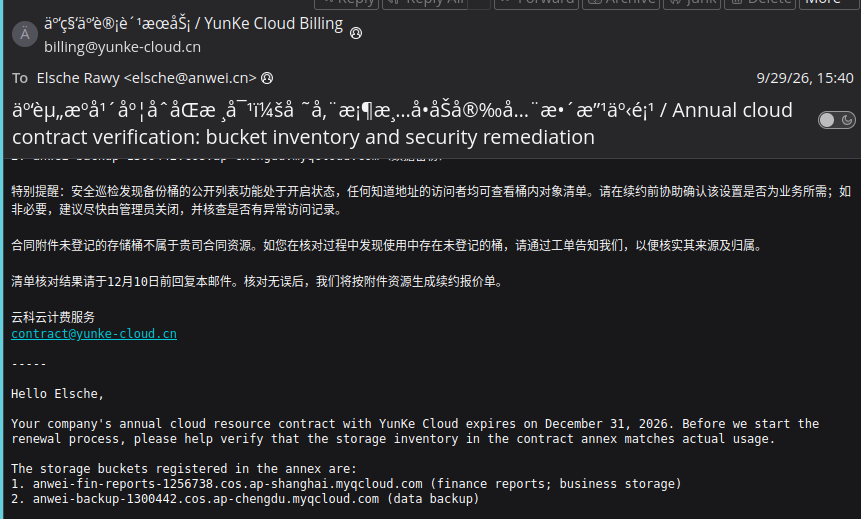
We checked Sysmon to see which process queried it.
The capture shows a DNS query for 1259834217 at 03:45:14 UTC and TLS SNI at about 03:45:19 UTC. Sysmon record 25417 gives us the process behind that query:
<EventData>
  <Data Name="UtcTime">2026-10-01 03:45:19.787</Data>
  <Data Name="ProcessGuid">219E604F-D74A-6ABD-9001-000000002000</Data>
  <Data Name="ProcessId">4820</Data>
  <Data Name="QueryName">1259834217.cos.ap-chengdu.myqcloud.com</Data>
  <Data Name="QueryResults">::ffff:129.211.120.34;</Data>
  <Data Name="Image">C:\Users\elshe\AppData\Local\Temp\RatSetup\Setup.exe</Data>
</EventData>
4. Following Setup.exe in Sysmon
We found Setup.exe in Sysmon.xml and followed its ProcessGuid to see what it wrote:
import xml.etree.ElementTree as ET

ns = {'e': 'http://schemas.microsoft.com/win/2004/08/events/event'}
events = list(ET.parse('case-b/Sysmon.xml').getroot())

def data(event):
    return {x.get('Name'): x.text for x in event.findall('e:EventData/e:Data', ns)}

def meta(event):
    return (event.findtext('e:System/e:EventID', namespaces=ns),
            event.findtext('e:System/e:EventRecordID', namespaces=ns))

setup = next(e for e in events if meta(e)[0] == '1'
             and (data(e).get('Image') or '').endswith(r'\Setup.exe'))
guid = data(setup)['ProcessGuid']
print('Setup.exe:', meta(setup), guid)
for e in events:
    d = data(e)
    if d.get('ProcessGuid') == guid:
        detail = (d.get('QueryName') or d.get('TargetFilename')
                  or d.get('ImageLoaded') or d.get('TargetObject') or '')
        print(*meta(e), d.get('UtcTime'), detail)
The first file creation was winsync.dll at 03:45:14.749 UTC. After the COS query, the same process wrote the next files under C:\Program Files (x86)\Common Files\System:
| Sysmon record | Event ID | What we found |
|---|---|---|
| 25317 | 1 | Setup.exe started, PID 4820 |
| 25318 | 11 | winsync.dll created |
| 25417 | 22 | Query for 1259834217.cos.ap-chengdu.myqcloud.com |
| 25319–25321 | 11 | douyin.exe, mpcache.dat, and engcore.dll created |
| 25323 | 11 | dbghelp.dll created beside douyin.exe |
We ordered the actions by UtcTime. The same process queried the bucket and wrote the payload files, giving us Q4 and Q5’s staging directory. The download paths remain hidden by HTTPS.
5. DLL Sideloading, Injection, and Persistence
We followed douyin.exe through its DLL loads and child processes, then checked the nearby registry and file events:
- Record 25328 shows
Setup.exeloadingwinsync.dll. Record 25324 shows its remote thread intosvchost.exe, and 25325 creates theSysHealthMonitorRun value pointing todouyin.exe --install. The thread source isSetup.exe, so the DLL connection comes from the load sequence. - Record 25330 starts
douyin.exe. Record 25339 shows it loadingdbghelp.dllfrom its own directory.engcore.dllwas written shortly before it, suggesting a renamed copy. We do not have both DLL samples to compare their hashes. - Record 25351 shows
douyin.exestartingnslookup.exeas PID 8064. Record 25354 shows remote-thread activity targeting that process. Record 25377 then showsnslookup.exesetting...\Software\ValleyRAT\BEIZHUtofinance-sz-04. - Records 25448 and 25538 show
nslookup.execreatingSrvRestart64.exe, answering Q9. The capture has no extractable0x07frame to identify the command behind it.
6. C2 Traffic and Live Memory
We followed nslookup.exe into its network events. Record 25450 lists destination 203.0.113.24:8443. We checked that endpoint in the capture and saw VALV at the start of messages when following the TCP stream:
tcpdump -nn -r case-b/capture.pcapng \
  'host 203.0.113.24 and tcp port 8443' | head
With that IP as our lead, we extracted readable memory strings and searched the surrounding lines. The -t d option prints each string’s decimal byte offset inside mem.raw, so we can use the search results to find the same bytes in a hex viewer:
strings -a -t d case-b/mem.raw > /tmp/rat-memory-strings.txt
rg -F -B 1 -A 3 '203.0.113.24' /tmp/rat-memory-strings.txt | less -S
There were plenty of hits. One had VALLEYC immediately before the IP and the group we had already seen in BEIZHU nearby. These are selected lines from that hit:
2762052912 VALLEYC
2762052920 203.0.113.24
2762053053 finance-sz-04
The search put VALLEYC at offset 2762052912. We used that as our starting point and inspected the surrounding bytes:
xxd -g 1 -s 2762052912 -l 192 case-b/mem.rawAfter the IP and its padding, we found fb 20 00 00 at 0xa4a19578 (2762052984 in decimal). xxd labels its rows in hexadecimal. Reading those four bytes as a little-endian integer gives 8443, matching the port from Sysmon and the capture:
python3 -c "print(int.from_bytes(bytes.fromhex('fb 20 00 00'), 'little'))"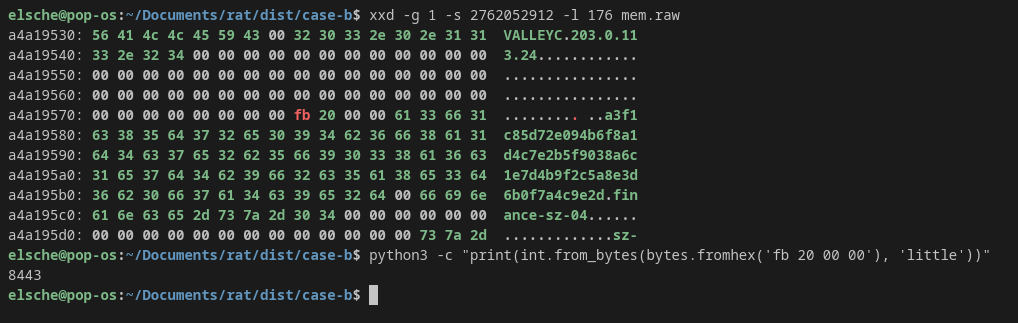
That gives us the endpoint from the memory record, with the traffic and registry value as checks. For Q11, a quick strings pass gave us a lead:
rg -F 'elsche@anwei.cn' /tmp/rat-memory-strings.txt | less -SOne result contained the email, a tab, and the password on the same line:
438240400 elsche@anwei.cn qg71-4Lw-dKM8@J>This hit gave us offset 438240400, so we inspected that area too:
xxd -g 1 -s 438240400 -l 64 case-b/mem.rawWe saw a leading space, the 15-byte email, then 09, the tab separator. The password starts 17 bytes into the hit, at 438240417. That was enough to spot the password, but not enough to prove where it came from. We still needed Volatility for that, and the pointer route below ties it to the live keylog object.

We converted the bundled PDB for Volatility and checked the live processes. Set VOLATILITY3 to your local Volatility 3 checkout before running the following commands:
export VOLATILITY3=/path/to/volatility3
mkdir -p symbols/windows/ntkrnlmp.pdb
(
  cd symbols/windows/ntkrnlmp.pdb
  PYTHONPATH="$VOLATILITY3" python3 \
    "$VOLATILITY3/volatility3/framework/symbols/windows/pdbconv.py" \
    -f ../../../case-b/symbols/ntkrnlmp.pdb
)
python3 "$VOLATILITY3/vol.py" -q --offline \
  -s symbols -f case-b/mem.raw windows.pstree
The converter names the symbol file from the PDB’s GUID and age. In pstree, we found nslookup.exe PID 8064 with AnweiERP.exe /batch PID 5540 below it. douyin.exe had already exited, so we used Sysmon record 25351 for its parent link.
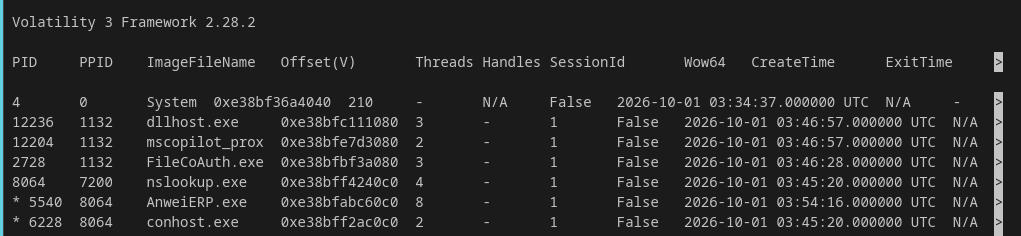
We saved page maps for both live processes to check where the carved bytes belonged:
python3 "$VOLATILITY3/vol.py" -q --offline \
  -s symbols -f case-b/mem.raw windows.memmap --pid 8064 > /tmp/nslookup.memmap
python3 "$VOLATILITY3/vol.py" -q --offline \
  -s symbols -f case-b/mem.raw windows.memmap --pid 5540 > /tmp/erp.memmap
We matched the offsets to each map’s [Physical, Physical + Size) ranges. The config at 2762052912 and password at 438240417 belong to nslookup.exe.
Following the Pointer to the Keylog Buffer
VALLEYC is flat, so it cannot point to the keylog. We used its virtual address from Q10 as an anchor. Searching mem.raw for a pointer to 0x28459f00530 gave one hit at physical 0xe1069088, which the nslookup.exe page map puts at virtual 0x28459ec6088.
Near it we looked for a std::vector shape (q1 >= q0, q2 >= q1, q2 - q0 == 0x1000) and required q0 to hold an email+tab line with printable/whitespace bytes. One candidate passed at 0x28459ec6030:
0x28459ec6030 -> 0x28459f08890   begin
0x28459ec6038 -> 0x28459f08919   end
0x28459ec6040 -> 0x28459f09890   capacity
The end-minus-begin difference is 0x89, or 137 bytes, while the allocation spans 0x1000 bytes. Following q0 through windows.memmap gives physical 0x9b265890:
9b265890: 20 65 6c 73 63 68 65 40 61 6e 77 65 69 2e 63 6e  elsche@anwei.cn
9b2658a0: 09 71 67 37 31 2d 34 4c 77 2d 64 4b 4d 38 40 4a  .qg71-4Lw-dKM8@J
9b2658b0: 3e ...                                            > ...
The VALLEYT pointer at 0x28459ec6028 sits in the same block. The old strings hit at 438240400 is a truncated copy, not the live vector buffer. Addresses move on rebuild, so find the shape again instead of hard-coding these values. Thanks to wavess for the pointer idea xixixi.
7. Payment Task and ERP Baseline
The ERP batch process was our next lead. We searched its filename in the memory strings:
rg -F -B 1 'AnweiERP.exe' /tmp/rat-memory-strings.txtOne hit was a task fragment after VALLEYT at offset 3449458576. Its readable beginning names the ERP executable and reference PO-2026-0217. The rest of that JSON is damaged, so we followed the reference to look for another record:
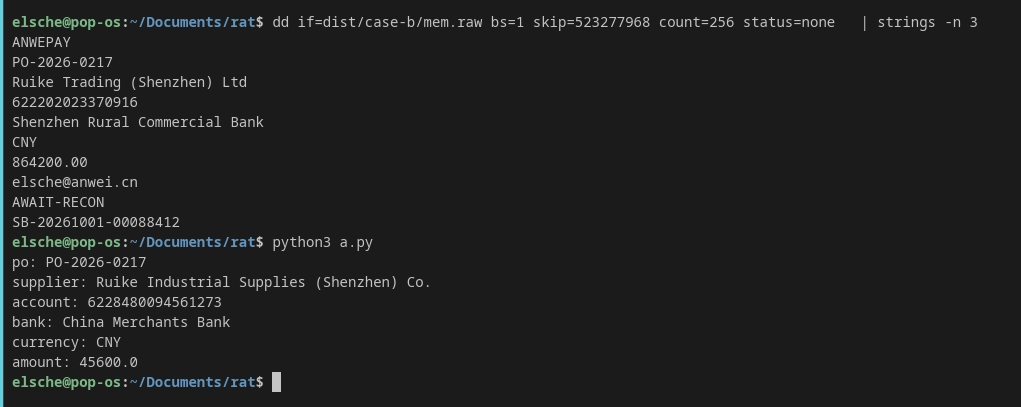
rg -F -B 1 -A 7 'PO-2026-0217' /tmp/rat-memory-strings.txtAmong the results was this block:
523277968 ANWEPAY
523277976 PO-2026-0217
523278000 Ruike Trading (Shenzhen) Ltd
523278064 622202023370916
523278088 Shenzhen Rural Commercial Bank
523278140 864200.00
523278156 elsche@anwei.cn
523278188 AWAIT-RECON
523278204 SB-20261001-00088412
Using the page maps, we placed the VALLEYT fragment in nslookup.exe and this ANWEPAY record in AnweiERP.exe. Sysmon record 25530 also shows nslookup.exe starting that ERP batch process.
We opened AnweiERP.db and found purchase_orders and approved_beneficiaries. We used the order reference from memory to look up its approved supplier, then compared that supplier’s account with the live payment:
import sqlite3

c = sqlite3.connect('file:case-b/AnweiERP.db?mode=ro', uri=True)
print('Approved PO:', c.execute(
    "SELECT * FROM purchase_orders WHERE po='PO-2026-0217'"
).fetchall())
print('Approved supplier:', c.execute(
    "SELECT b.* FROM approved_beneficiaries b "
    "JOIN purchase_orders p ON p.supplier=b.supplier WHERE p.po='PO-2026-0217'"
).fetchall())
print('Diverted account in approved list:', c.execute(
    "SELECT * FROM approved_beneficiaries WHERE account='622202023370916'"
).fetchall())
The approved order was CNY 45,600.00 to Ruike Industrial Supplies (Shenzhen) Co., account 6228480094561273. The diverted account query returned no row. That mismatch gave us Q12.
Answering the 12 Questions
Here are the 12 answers we would enter, with the evidence we used for each one.
Question 1
What is the share ID of the malicious AI-generated presentation that was used to host the phishing chain?
Answer: d-8fk2qmvx.
We found the “Q1 Sales Performance Review” notification in Hannn’s mail.pst. Its PDF attachment links to https://app.mir.ai/d/d-8fk2qmvx, which also appears in case-a/History. The last part of that URL is the share ID. Hannn visited other decks, but they did not match this PDF.
Question 2
After the stolen session cookie was replayed, from which IP address did the attacker access the mailbox?
Answer: 45.148.10.77.
We filtered case-a/entra_signins.json for hannn@anwei.cn. Earlier rows show Shenzhen access from 203.80.14.132. Later Outlook and EWS rows show 45.148.10.77 in Moscow. We used the 10:30 UTC Outlook row for the mailbox access after replay.
Question 3
From which website did the victim download the malicious software?
Answer: software.аnwei.cn (wire form software.xn--nwei-43d.cn).
The fake update in Elsche’s mail.pst links to the lookalike site. case-b/History records both a visit to https://software.xn--nwei-43d.cn/ and a Setup.zip download from its /download/ path. The mail’s а is Cyrillic. The routine internal portal uses Latin a.
Question 4
From which cloud storage bucket did the malware download its payload files?
Answer: 1259834217.cos.ap-chengdu.myqcloud.com.
The contract mail names the approved COS buckets. We found this extra hostname in Case B’s DNS and TLS traffic. Sysmon record 25417 shows Setup.exe querying it, and records 25319–25321 show the same process writing the staged files right afterward. That is how we picked the payload bucket. HTTPS does not show the individual download paths.
Question 5
Which ZIP archive did the victim download, and into which directory did the dropper stage its payloads?
Answer: Setup.zip, C:\Program Files (x86)\Common Files\System.
The downloads table in case-b/History gives us C:\Users\elshe\Downloads\Setup.zip. Sysmon FileCreate records 25318–25321 show Setup.exe writing winsync.dll, douyin.exe, mpcache.dat, and engcore.dll into Common Files\System. We entered the ZIP name and that directory.
Question 6
Which DLL did the signed loader sideload from its own directory, and which downloaded payload was it a renamed copy of?
Answer: dbghelp.dll, engcore.dll.
We saw engcore.dll created in record 25321, then dbghelp.dll beside douyin.exe in 25323. Record 25339 shows douyin.exe loading the local dbghelp.dll. The paths and timing point to a renamed copy. We do not have both DLL files in the player package to compare their hashes.
Question 7
Into which system process did winsync.dll inject its monitoring code, and which Run-key value name did it create for persistence?
Answer: svchost.exe, SysHealthMonitor.
After Setup.exe loads winsync.dll, CreateRemoteThread record 25324 names svchost.exe as the target. Registry record 25325 creates ...\CurrentVersion\Run\SysHealthMonitor and points it to douyin.exe --install. Sysmon calls Setup.exe the thread source. We connect winsync.dll to that step through the preceding DLL load.
Question 8
Which process was hosting the RAT when memory was acquired, and which process was its parent?
Answer: nslookup.exe, douyin.exe.
Sysmon record 25351 shows douyin.exe starting nslookup.exe. Record 25354 shows a remote thread into it. Volatility windows.pstree shows nslookup.exe PID 8064 alive in memory, and its page map contains the VALLEYC config, VALLEYT task, and keylog. douyin.exe had already exited, so we got the parent name from Sysmon.
Question 9
What is the filename of the second-stage persistence binary created by the RAT-hosting process?
Answer: SrvRestart64.exe.
Sysmon FileCreate records 25448 and 25538 show nslookup.exe writing C:\Program Files (x86)\Common Files\System\SrvRestart64.exe. We entered the filename. The question does not ask for a C2 command ID.
Question 10
What C2 endpoint (ip:port) does the implant contact? Carve it from the implant config in memory and confirm it against the traffic capture.
Answer: 203.0.113.24:8443.
We decoded the VALLEYC hit at memory offset 2762052912. It gives host 203.0.113.24, port 8443, and group finance-sz-04. windows.memmap places the hit in nslookup.exe PID 8064. The capture shows TCP sessions to that same endpoint.
Question 11
What group id is pinned in the implant config (the BEIZHU remark value), and what password string does its keylog buffer hold?
Answer: finance-sz-04, qg71-4Lw-dKM8@J>.
The VALLEYC config says finance-sz-04. Sysmon record 25377 shows nslookup.exe writing the same value to ...\Software\ValleyRAT\BEIZHU. In memory, we found elsche@anwei.cn<TAB>qg71-4Lw-dKM8@J> on one keylog line. We took the text after the tab as the password. We also checked it the pointer way in section 6: find the keylog vector, follow its first pointer, and read the live buffer. That gives the full 137 bytes instead of the truncated strings copy. Thanks again to wavess for the pointer idea.
Question 12
Before detection, the intruder used the implant to submit a payment from the victim’s own ERP console. What beneficiary account number did the funds go to, and in what amount?
Answer: 622202023370916, 864200.00 (CNY).
The ANWEPAY hit at memory offset 523277968 holds PO-2026-0217, account 622202023370916, amount 864200.00, and status AWAIT-RECON. Volatility maps it to AnweiERP.exe PID 5540. Sysmon record 25530 shows that batch process starting under nslookup.exe. The database lists account 6228480094561273 and CNY 45600.00 for the approved order. It has no approved beneficiary row for the diverted account.
Lessons Learned
Looking back, I think I gave away too much by including Sysmon.xml. Several questions could be answered with strings and grep. Next time, I would keep it for checking the lab run and have participants work from memory and traffic.
I also need to vary the questions more. I kept asking for filenames and process names, which made parts of the solve feel repetitive. The keylog pointer method was closer to what I wanted participants to work through.
I would also use a local lab account, keep personal Outlook, OneDrive, and browser sync off, and take a clean snapshot before the run. If I sign in by mistake, restore that snapshot and capture again. I wanted to dump the victim’s memory and somehow included myself too :u